For parents

Stay close to your child's progress.

Groupset helps you and your coach recognize your child's progress through the team's year.

See what you can see

What changes for you

Five things you can count on.

Each one answers a question parents ask at the trailhead or on race day.

  1. 01Check-in and out
  2. 02Emergency card
  3. 03Progress
  4. 04Live results
  5. 05Team communication

Check-in and out

5:45 Tuesday, September 15

Groupset now

Maya checked in

Valley Vista/PG Bench · 5:45 PM

Coach Dana recorded the check-in.

You know when your rider is checked in and out.

When a coach checks your athlete in or out of practice, you get a notification during practice and for about an hour after it ends. If the coach's phone has no signal, the check-in sends when it reconnects.

It shows what a coach recorded, not how your rider is doing. If you have a concern, call your coach.

Emergency card

Emergency contacts on a rider's profile in Groupset.

Your coach has your emergency contact card.

Every coach can see the emergency contacts on your rider's record. Coaches with Level 2 can also see the medical note. The card is saved on the coach's phone for trailheads with no signal.

If a rider needs medical attention, that conversation happens by phone at the scene.

Progress

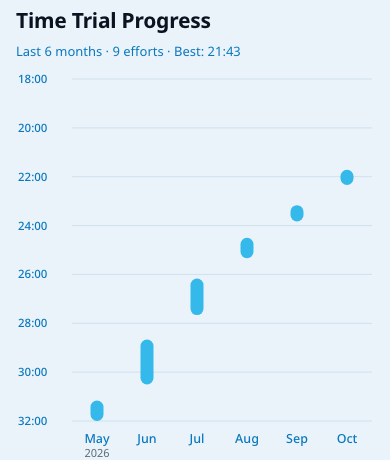
A rider's time-trial progress chart in Groupset, showing six months of efforts.

You can see the progress.

Attendance, time-trial efforts, personal records, and race results show how the team is progressing. The quiet rider is on the same record as the podium finisher; you see your own child's record, while the team performance dashboard stays the coach's view.

Strava adds weekly rides and personal records. Attendance and race results do not need it.

Live results

Live race results grouped by category in Groupset.

Race day reaches you where you are.

Results update as the timing system posts them. When your rider records a new lap or place, a push lands on your phone, and tapping it opens the result.

Team communication

A team chat channel in Groupset with coach and team messages.

You and your coach stay on the same page.

Announcements, team chat, and the schedule live in one place. Ask in the team's channel when you need the coach; athletes can post only when an adult is in the channel.

The family dashboard

One place for the family side of the team.

When you open Groupset, you see the coach's updates, the next practice, and the parts of the team that need you. You get insights about your child's progress on their dashboard, but the team's performance dashboard stays with the coaches.

Coach updates and team chat

Announcements and team chat keep the coach's updates and your questions in one place. Ask in the team's channel; athletes can post only when an adult is in the channel.

Schedule, RSVPs, and reminders

Practices, races, and social events live in one schedule. RSVP for each child, get a reminder about an hour before, and add the team calendar to your phone.

Volunteer shifts and family hours

Claim a race-day shift or a bring-an-item task in a tap. Your family's hours add up toward the team's volunteer target and milestone badges.

Co-parent access

Invite another parent or guardian to help manage the same child. They can see the rider's profile, check-in status, and team announcements.

Your rider's check-ins, race results, and emergency card sit alongside these. The family dashboard is the part of the team that belongs to you.

The team's year

The team's year runs in five phases.

Each phase answers a different question a parent has, from the first registration to the final result.

  1. 01

    Registration

    You register your rider, add at least one emergency contact, and sign the team consents. The record starts before the first practice.

  2. 02

    Time trial and group assignment

    Coaches time a baseline segment. The first attempt sets each rider's reference point, and the practice group follows what the record shows.

  3. 03

    Monitor training progress

    Attendance, weekly rides, time-trial efforts, and personal records show how the team is progressing. You see your own rider's record.

  4. 04

    Volunteer

    Claim a race-day shift or a bring-an-item task. Your family's hours count toward the team's volunteer target and the milestone badges.

  5. 05

    Race day

    Results update as the timing system posts them. A push lands when your rider records a new lap or place, and the finish stays on the record.

Privacy and parental controls

Your family's data belongs to your family.

Parents see only their own children. Coaches see the groups they coach, and every coach can see emergency contacts. Medical details are limited to Level 2+ coaches, team admins, and the athlete's parents.

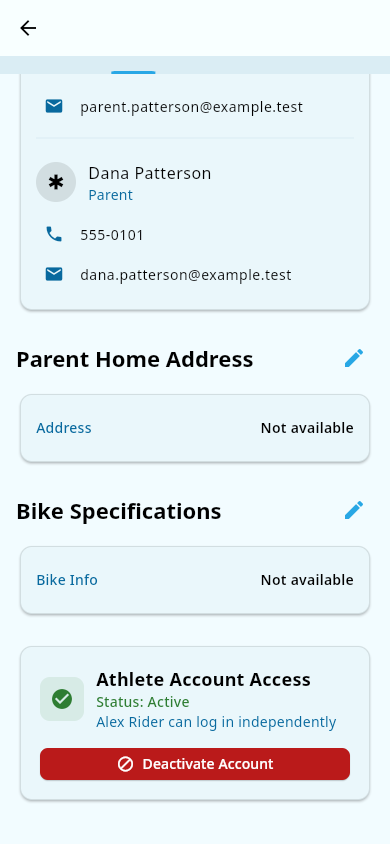
Athlete Account Access lives on your child's page. You can deactivate or reactivate their sign-in there. Deactivating blocks sign-in only; it does not delete the record or remove them from the roster.

Delete My Data lives in your account screen, under the Danger Zone. Confirm the request from the email, and it is processed within 30 days. You can also request deletion without signing in.

Athlete Account Access

Child's page → Athlete Account Access → Deactivate Account. Reactivate from the same card whenever you choose.

Delete My Data

Account screen → Danger Zone → Delete My Data. The request is separate from a roster deactivation.

The Athlete Account Access card on a child's page, with the Deactivate Account button.

A note from your coach

Your coach chose Groupset so they could spend more time coaching your kid.

From the first time trial to race day, you can follow the team from your phone: check-ins, progress, race results, and the coach's updates in one place.

Read the support wiki

Questions your coach cannot answer? Email support@highfivelabs.net.