Co-parents and guardians
Who this is for: parent Applies to: all
What this page covers
A co-parent is another parent or guardian you invite to help manage your child in Groupset — for example, the child's other parent or a grandparent. This page explains how to send that invitation, how long it stays valid, and what the person you invite can and can't see and do. If you've been invited as a co-parent, this page also tells you what to expect when you accept.
Before you start
- You must be signed in to the account that is linked to the child as a parent (the account that registered the child or manages their record).
- You'll need the email address of the person you want to invite.
- Open the child's page from your children list, or find the child in the roster and open their record.
Step-by-step
Invite a co-parent
- Open the child's page.
- Find the Linked Parents section.
- Tap Invite Co-Parent (or Invite Another Parent, if you've already linked someone). If you don't see these buttons, you're not linked to this child as a parent.
- In the Invite Co-Parent window, enter the person's email address.
- Choose a relationship to describe who they are — Parent/Guardian or Other.
- Tap Send Invitation.
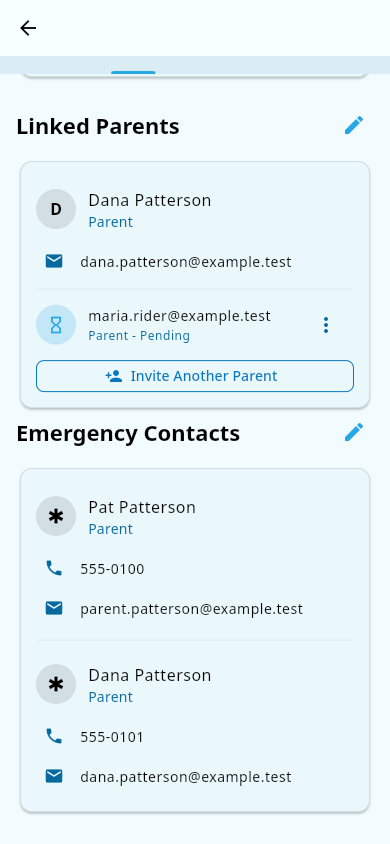 A linked parent and a pending invitation shown under Linked Parents, with the button to invite another parent.
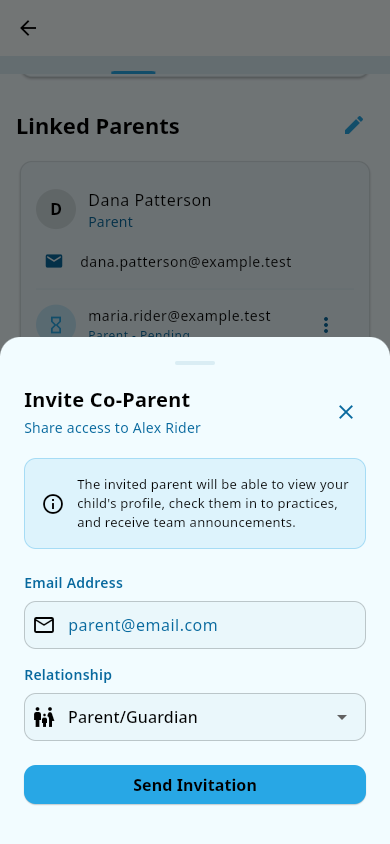 The Invite Co-Parent window: enter the email address, choose a relationship, and send the invitation.
The person you invited accepts
- The invited person receives an email with a link to accept the invitation.
- They open the link. If they don't have a Groupset account yet, they'll create one; if they already have one, they sign in and confirm.
- Once accepted, their name appears under Linked Parents on the child's page, and they can open the child's record from their own account.
Invite more than one person
Repeat the steps above for each additional parent or guardian. More than one co-parent can be linked to the same child at the same time.
If the invitation expires
- Invitation links are only valid for 48 hours after they're sent.
- If the link expires, go back to the child's Linked Parents section — the invitation still shows there as pending.
- Tap the menu next to the invitation and choose Resend. Resending sends a fresh link and renews the 48-hour window.
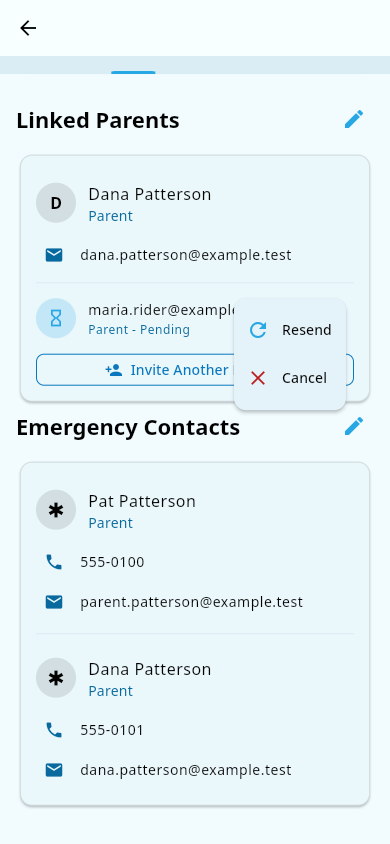 The invitation menu on a pending row, with options to resend or cancel.
What you should see
- A new invitation shows as pending under Linked Parents, with the person's email and relationship, until they accept it.
- Once accepted, the co-parent can sign in with their own account and see the child's profile and basic information, check the child's practice check-in status, and receive team announcements.
Notes and limits
- A co-parent sees the child's profile and basic info, practice check-in status, and team announcements. They do not see payment details, and they don't receive payment receipts.
- You can cancel an invitation that hasn't been accepted yet — open the invitation's menu and choose Cancel. Cancelling can't be undone, but you can always send a fresh invitation.
- Once someone is linked as a co-parent, there is no self-serve way for you to remove them. If a co-parent relationship needs to end, or if a co-parent who was previously disassociated needs to be re-linked, you have to contact support. This is by design.
- Invitation links expire after 48 hours. If a co-parent tells you the link no longer works, use Resend rather than sending a brand-new invitation.
Related pages
- Register your athlete (parents) — adding a child so you can invite other people to help manage them.
- Medical and consents — what linked parents can view and manage on the record.
- Attendance — checking a child's practice check-in status.
- Announcements — team broadcasts a co-parent receives.
- Accounts, deactivation, and deleting your data — what happens if a co-parent's access needs to be removed.