Customize your team's consent forms
Who this is for: team admin Applies to: all
What this page covers
The three agreements families sign for an athlete — team policies, the liability waiver, and the photo release — and how to put your team's own wording in place of the built-in text. After reading you'll be able to update each agreement's text, restore the defaults, and you'll know where parents see it.
Before you start
- You must be a team admin on the team.
- Open Team Settings and tap the Consents tab (the page is titled Consent Agreements).
- Have your final wording ready for each agreement you want to change. The three agreements are:
- Team Policies,
- Liability Waiver, and
- Photo/Media Release.
- In the app today the registration wizard requires all three to be agreed before a family can continue; the photo release is the one teams often describe as optional.
Step-by-step
- Open Team Settings and tap Consents.
- On Consent Agreements, edit the wording for any of the three agreements. The page explains: "Customize the consent agreement text that parents will see during athlete registration. Leave empty to use default text."
- Leave a field empty to keep the built-in wording for that agreement.
- Tap Save.
To restore the built-in wording: tap Reset to Defaults and confirm. This removes all of your custom wording and cannot be undone.
What you should see
- The app confirms "Consent agreements saved successfully!".
- The saved wording is what parents are shown:
- during registration of an athlete (the Consent & Agreements step of the wizard), and
- later, in the consent management screen, where a parent reviews, re-signs, or switches off each agreement.
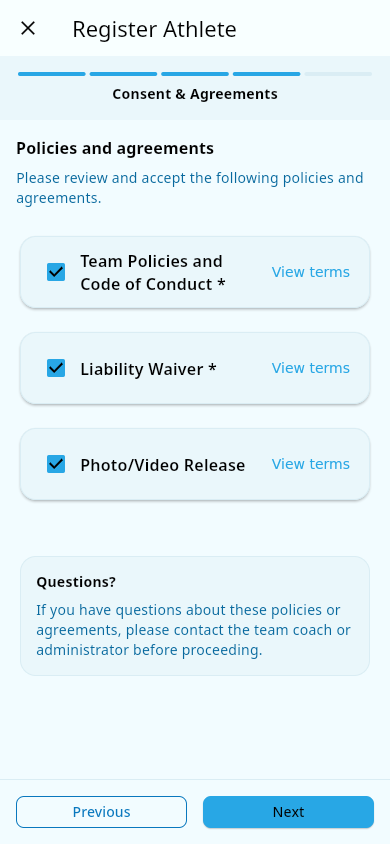 The Consent & Agreements step of the registration wizard, as a parent sees it.
- Each signature is recorded with who signed and when. Each agreement is stored once per athlete — a parent signing again (for example, after changing their mind) replaces the earlier record rather than creating a second one, and parents can switch an agreement off (revoke it).
Notes and limits
- Consents belong to the athlete's record: each agreement is signed per athlete, not once per family.
- Only team admins can change the wording. Parents sign during registration and manage (update or revoke) their own athlete's consents afterwards.
- Open question: the source does not say whether changing the wording asks parents to sign the new version again, or whether their earlier signature stays valid.
Related pages
- Medical and consents — emergency contacts, medical notes, and how parents manage consents.
- Register an athlete — where the consent step happens during registration.