Coach insights troubleshooting
Who this is for: coaches Applies to: Android · iOS · Web
What this page covers
Why a coach insights report might look stale, why one group's list can be a day behind another, what the red dot and the "Note from" dates mean, and why you might not get a Sunday push. Each problem explains the symptom, why it happens, and what to do about it.
Common problems
The report looks stale, or one group is behind another
Symptom: A group's list shows older information than you expected, or one group's actions are a day behind another group's.
Likely cause: Reports are served from a stored copy that the app rebuilds overnight, and the copy can be up to about two days old. The overnight rebuild also has a budget — only a few groups can be rebuilt each night — so a specific group's list can lag a day behind others. This is expected, not a bug.
What to do: Nothing. The group's list catches up on a later night. A problem with one group's data only affects that group — every other group's report still rebuilds on schedule.
A coach note shows "Note from" with a date
Symptom: A note is labelled Note from followed by a date, rather than reading like a fresh note.
Likely cause: A note is marked Note from with a date (the actual date) when it's older than about two days, so you can see how fresh it is.
What to do: Nothing. Use the date to judge whether the note is recent before acting on it.
"You don't have access to this group's insights"
Symptom: When you open a group's report, you see You don't have access to this group's insights.
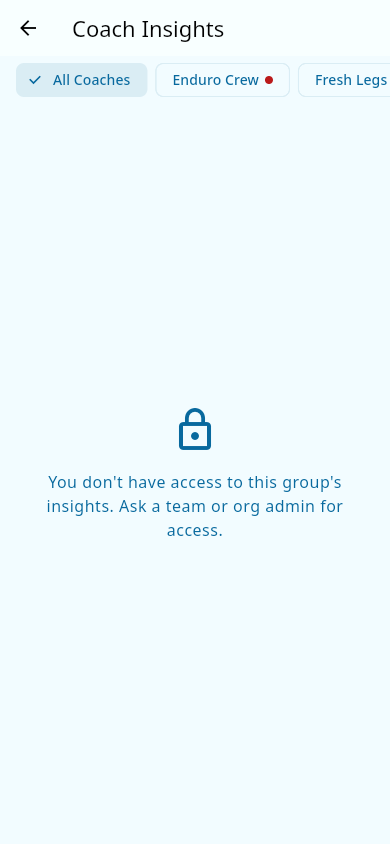 The message shown when you open a group's insights you aren't assigned to.
Likely cause: You aren't assigned to that specific group. Reports are per group, and you only see the groups you coach.
What to do: Ask your team admin to add you under the group's Coaches tab.
A group shows a red / urgent state
Symptom: A group is flagged as urgent (red) — or a rider you expected to be flagged isn't.
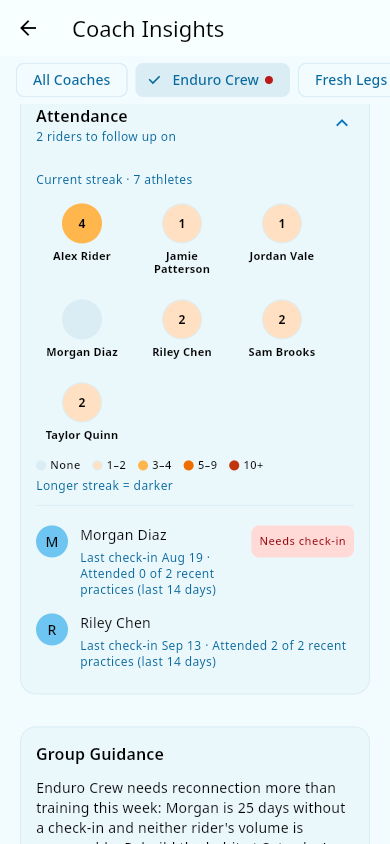 The group's report flagged urgent, with riders who need a check-in.
Likely cause: The red dot means the group has new or still-aging actions this week — for example, an athlete the team hasn't seen in a while, or a rider whose training load spiked. Only actions set it: a week with nothing but celebrations never shows the red dot. One more thing that can make a group look quieter than you'd expect: if the team exempts some grades from attendance requirements (for example, grades 7–8 after their season ends), those athletes still appear in attendance reporting and the streak heat map, but they don't generate attendance reach-out actions.
What to do: Open the group's report and look at the action list for the riders it's flagging.
The celebrations list isn't what you expected
Symptom: The Celebrations list shows items you didn't expect, or misses something you thought was recent.
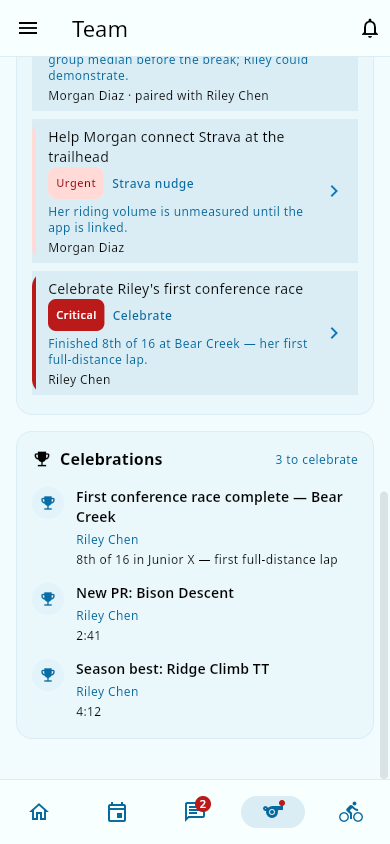 The Celebrations list, showing true milestones such as personal records and season bests.
Likely cause: Celebrations are narrowed to true milestones — personal records, season bests, and attendance-streak milestones. Regular posts and other feed entries never appear, the list only reaches back a few weeks (roughly the last month), and each milestone is only celebrated once.
What to do: Nothing — non-milestone entries are filtered out by design.
The triage card came back even though nothing changed
Symptom: You dismissed the triage card for the week, but it reappeared the next week even though nothing new happened.
Likely cause: Dismissal is per group per week. The card is dismissed for the week but comes back the following week regardless of whether anything changed — it isn't "until something new."
What to do: Nothing. If you don't want to see it this week, dismiss it again; it will return next week.
A skills list seems to leave out some riders
Symptom: A rider you'd expect on a skills list isn't there, or the list is short.
Likely cause: Skills lists are deliberately short: they only show riders who are at least 20% off the group median, use only fresh (about 28-day) efforts, need at least three riders to compute a median, and require the rider to have Strava rides to compare. Each list caps at a couple of names. The report as a whole carries at most five actions, and each rider appears at most once.
What to do: Nothing. This is by design so lists stay meaningful and current.
You didn't get the Sunday push
Symptom: It's Sunday (or later) and you got no push notification about a group.
Likely cause: One of these things — your team's time zone isn't set (a team with no time zone never gets pushes), it simply wasn't your week (each coach gets at most one insight push per week, and only when a group needs attention), or the week only had celebrations (weeks with nothing but celebration items never trigger a push). Attention from race week that you've already handled or dismissed — or that passed when the race did — doesn't count toward a push either. An earlier version could also silently skip the weekly notification for some teams — for example, teams using groups shared across a whole organization — but that has been fixed, and the weekly notification now goes out reliably.
What to do: Check that your team has its time zone set, and remember pushes are at most once a week and only for groups that need attention. If you coach groups in more than one team, notifications are per team — at most one per team, each about that team's own groups. When a push does arrive, a matching notification lands in the in-app Notification center at the same time. You can always open Coach insights directly.
Notes and limits
- Reports reflect data through the end of the previous day, but the nightly pass runs at a fixed time that lines up with US time zones. For teams far from US time, the boundary can be approximate.
- A group's list being a day behind is expected on the nightly budget — see the first problem above.
- The report's sections render in a fixed order: Volume, Skills, Attendance, Group Guidance. Actions and celebrations live on the Group tab.
Related pages
- Coach insights — the how-to guide for reading the report.
- Sign-in and account — if you can't open the app to check a report.