Follow accounts
Who this is for: someone who wants to follow a race and a rider without joining a team Applies to: Android · iOS · Web
What this page covers
A Follow account lets you follow a race and a few riders and get updates while they race — without belonging to a team. This page explains what a Follow account is, how to sign in from an invitation (one email and a one-time code), how the app works out whether you are new or returning, the short finish step for a brand-new follower, and how to sign out.
Before you start
- You may have an invitation link from someone who is already following the race. See Sharing and invitations — you can also start without one.
- You need an email address you can check — there is no password. Groupset sends a one-time code to your email to confirm it's you.
- You must be 13 or older.
Signing in to follow
Following uses one sign-in screen for everyone, new and returning alike. You are never asked which you are — the app works it out from your email, after the code is verified.
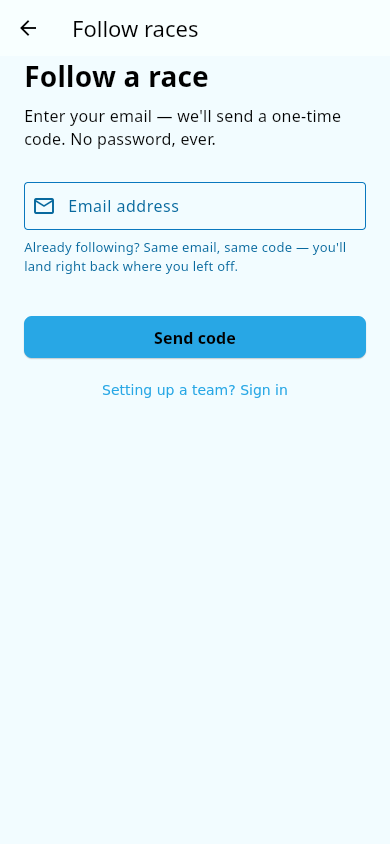
- Open the Follow a race door. There are three ways in: the welcome screen's Follow a race row (captioned "Follow free, no password."), the sign-in screen's "Following a race? Follow a rider — free, no password." link, or an invitation link someone sent you.
- On the Follow a race screen, type your Email address and tap Send code. The screen says "Enter your email — we'll send a one-time code. No password, ever."
- Check your email for a 6-digit code.
- On the Verify Your Email screen, type the code and tap Verify. If it doesn't arrive, tap Resend Code.
- The app then works out whether you are new or returning:
- Already following? You go straight back into the Follow app, with your races and pinned riders as you left them. (If you arrived from an invitation link, that invitation is applied first — see Sharing and invitations.)
- New here? You continue to the short finish step below.
What you should see: a returning follower lands on the Follow Home tab with their races and riders; a brand-new follower sees the Follow your rider finish step.
Finishing a new Follow account
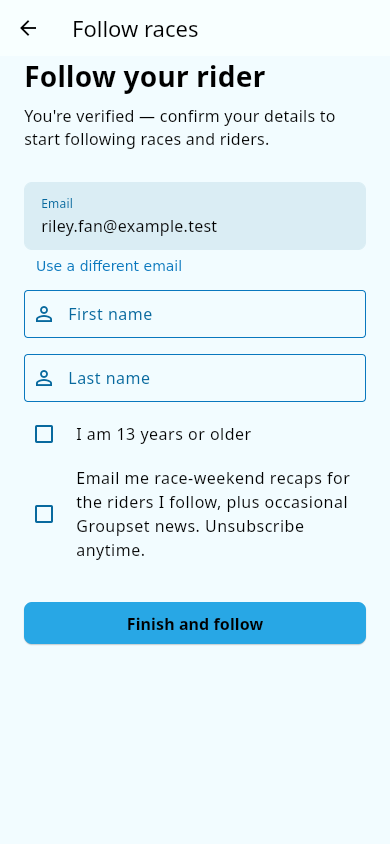
The email you just verified is shown at the top of this screen as a read-only reminder of which address you are setting up. If it isn't the right one, tap Use a different email and start again.
- Enter your First name and Last name.
- Tick I am 13 years or older. This is required — the account isn't created without it.
- Optionally tick "Email me race-weekend recaps for the riders I follow, plus occasional Groupset news. Unsubscribe anytime."
- Tap Finish and follow.
What you should see: a new follower lands in the Follow app, where the Home tab shows "Follow a race to get started" until you follow your first race. If you arrived from an invitation, the invitation is applied as part of finishing: you land on that race, already followed, with the invited rider pinned — unless you already have 5 pinned riders, in which case the app says so and you can unpin one.
If your email is already a team account
Follow accounts are separate from team accounts, and one email address can't be both. If the address you entered already belongs to a team account, the app says so instead of creating a Follow account — for example: "you@example.com is already a team account. Follow accounts are separate — use a different email to follow."
That isn't a fault on your side. It means that address is already in Groupset as a team member, so:
- If you want to follow with that team account, sign in to it instead — the Follow screens carry a Setting up a team? Sign in link for exactly this.
- If you want a separate Follow account, use a different email address at the Follow door (tap Use a different email on the notice).
What you can do with a Follow account
- Follow a race and see it on your Races list.
- Pin up to 5 riders to get their lap, start, and finish updates (see Following races and riders).
- See each pinned rider's wave and start time on race day, with a countdown to the start (see Race day and results).
- Get updates in your Inbox and, if you allow notifications, as push alerts (see Follow notifications).
- Share a pinned rider's result as an image once their finish time is published (see Race day and results); it is the same result image a team member can export for their own rider.
- Invite someone else to follow the same race (see Sharing and invitations).
What you don't see
A Follow account is deliberately small. You do not get team features — no team Home feed, roster, chat, events, attendance, payments, or medical information. You see only the races you follow, the riders you pin, and their race-day updates.
Signing out
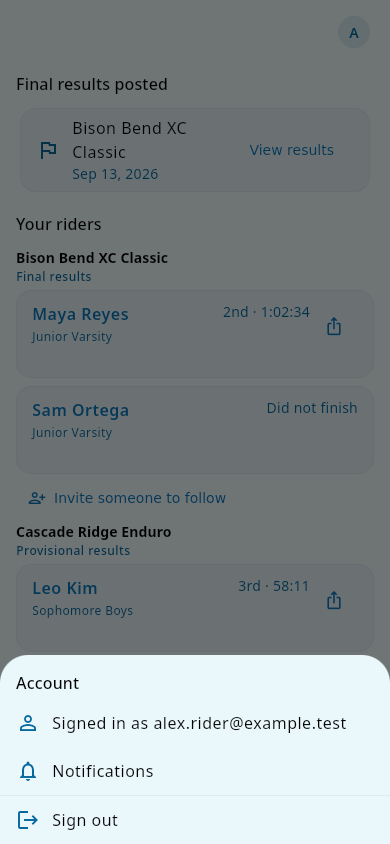
- On the Home tab, tap the account avatar in the top corner.
- The account sheet shows Signed in as
, a Notifications entry, and a Sign out button. - Tap Sign out and confirm.
What you should see: you return to the welcome screen, and alerts stop arriving on that device. Your follows and pins are kept. Because there's no password, you sign back in with the same email and a one-time code — the same email, the same code, and you land back where you left off.
If you don't see "Follow a race"
If you don't see a Follow a race option or an invitation link doesn't open the Follow sign-in, it may not be available in your version of the app yet. Update Groupset and try again. If it still isn't there, the feature may not be available to you right now.
A race that has nothing published yet is a different matter: a race only becomes followable when its organizer publishes it here.
Notes and limits
- A Follow account has no team and no password — signing back in always uses your email and a one-time code.
- Your display name is never shown to riders or coaches.
- The optional recap-and-news emails are only sent if you tick the box at sign-up. Everything else a Follow account receives is race-day updates.
- Follow covers only the races the organizer has published in the app, not every race weekend, and race timings can be provisional.
Related pages
- Following races and riders — follow a race and pin your riders.
- Race day and results — what you see while a race is running and after.
- Follow notifications — the updates you get and how to reduce them.
- Follow alert settings — switch the individual Follow alerts on or off.
- Sharing and invitations — send and receive follow invitations.
- Core concepts — following, pins, and the Home rider card in one place.
- Create your team account — the other kind of Groupset account, if you also coach or ride for a team.
- Troubleshooting: follow and invitations — if a link or sign-up won't work.