Follow notifications
Who this is for: a follower who wants race updates Applies to: Android · iOS · Web
What this page covers
The alerts a Follow account receives on race day, where they arrive, and how to reduce them. Follow alerts are quiet and factual — a call-up reminder, a wave start, lap and finish updates, final results, and corrections.
Before you start
- Follow a race and pin at least one rider — see Following races and riders.
- Push notifications are optional; without them you still get every update in your Inbox.
What triggers an alert
You get updates for the races you follow and the riders you pin:
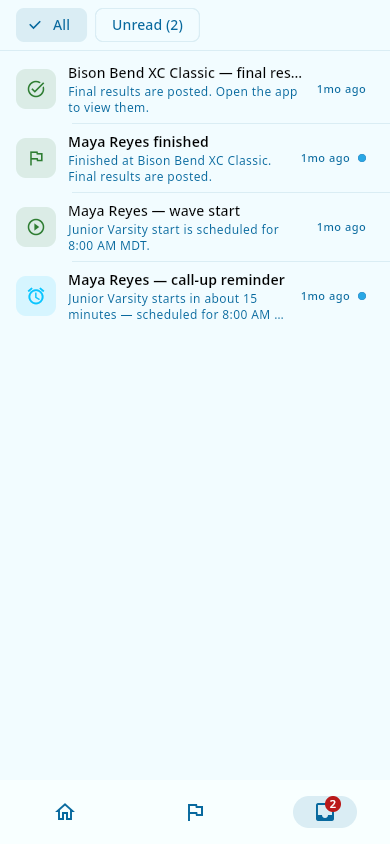
- A call-up reminder — about 15 minutes before a pinned rider's wave starts, so you know to head to the staging area: "…starts in about 15 minutes — scheduled for 8:00 AM MDT. Head to the staging area."
- A wave start — at the wave's published start time.
- A pinned rider's lap — recorded each time one of your pinned riders crosses a lap.
- A pinned rider finishes — when the organizer's finalized results show your pinned rider as finished. Live race-day data can mark a rider finished while they are still racing, so this alert is held until results are finalized.
- Final results posted — once the organizer posts final results for the race.
- A correction — if the organizer updates results after they were finalized.
- A start-time change — if the organizer moves a wave's start after a reminder or start alert was already sent, so you are told the new time rather than being left with the old one.
A lap alert reads, for example: "Currently 3rd • Last lap 23:22 • Total 47:13" — your rider's place and times from the latest timing update. This is the same wording a parent receives for their own rider.
The call-up, wave-start, and start-time-change alerts only ever name the time the organizer published, and always label it as the planned start. If the organizer hasn't published a start for a rider's wave yet, no call-up or start alert goes out for it.
Where alerts arrive
- Inbox tab: the Inbox tab in the Follow app holds your notifications. New ones arrive as they happen and carry an unread dot; opening one marks it read, and the All / Unread chips at the top filter the list.
- Push to your device: with notifications allowed, alerts appear on your phone even when the app is closed. On the web they arrive as your browser's own notifications, so the browser has to allow them — if they are blocked, the app says so and points you at your browser's site settings.
- Tapping an alert opens the Results screen for that race, focused on the rider the alert names (a whole-race alert, like final results, opens the same screen without a rider focus).
When the app asks to allow notifications
Groupset does not ask for notification permission at sign-up. On a phone it asks the first time you follow a race or pin a rider — right when the alerts become relevant. On the web, a banner reading "Enable notifications to get team updates." with an Enable action can appear when the app starts as well as at your first follow or pin. You can change this later in your device settings.
Changing which alerts you get
Open the account sheet (the avatar in the Home header) and tap Notifications. There you can switch the Call-up reminder, Wave start, Finish, and Final results alerts on or off individually, and turn on Alerts in the app only to stop push notifications while keeping every update in your Inbox. See Follow alert settings.
Reducing alerts
- Switch off an alert type: use the Notifications screen above — for example, keep the finish alerts but drop the call-up reminders.
- Pause a race: open the race and turn on Mute updates ("Stay followed, pause notifications."). You stay followed, but no alerts arrive for that race while it's muted. Turn it off to resume.
- Stop a rider's updates: unpin that rider on the race screen. There isn't a separate per-rider lap switch in the app, so unpinning (or muting the whole race) is how you quiet a single rider.
- Stop everything for a race: tap Unfollow to end your follow entirely.
Notes and limits
- Follow alerts are process-focused — a lap alert names your rider's place and times from the latest timing update, the same wording parents see. They never use medal, podium, or ranking-celebration framing.
- A very active race is capped so you aren't flooded: at most 60 alerts per race in any rolling hour, counting every kind of alert together.
- Call-up and wave-start alerts also share a daily limit — at most 10 per race per day. A start-time change notice is deliberately not counted against that daily limit, so a correction still reaches you even on a busy day.
- The app never sends a start alert late: once a wave's start window has passed, that alert is skipped rather than sent as "starting now".
- If you sign out, Groupset stops sending alerts to that device.
- Follow covers only the races the organizer has published in the app, not every race weekend.
Related pages
- Following races and riders — follow, pin, and mute controls.
- Race day and results — the wave times and results view those alerts point to.
- Follow alert settings — turn the call-up, wave-start, finish, and final-results alerts on or off.
- Notifications — how notifications work for the whole app.
- Core concepts — the alerts a follower can receive, in one place.
- Troubleshooting: follow and invitations — if alerts aren't arriving.