Ride log: coach-logged group rides
Who this is for: coaches, team admins, athletes, and parents Applies to: Android · iOS · Web
What this page covers
The ride log lets a coach confirm one of their own synced rides as the practice group's group ride. Every athlete who checked in and rode in that group then gets a read-only ride entry — a coach-logged ride — built from the practice's ride totals. This page explains why that exists, who can do what, and what the team sees. The steps live in Log a group ride and See and remove a coach-logged ride.
Why it exists
Some athletes don't have their own ride-tracking account, often because a parent manages their Groupset account. Without the ride log, their practice riding wouldn't appear in the team's ride numbers at all. The coach's ride fills that gap, so the team still sees each athlete's practice volume — while the entry stays clearly labelled as an estimate.
A group ride is not a GPS recorder, and Groupset doesn't copy the coach's full route. It keeps ride totals that cover the practice window only.
How it works
- A coach checks in at a practice. Coaches can check themselves in from the event's check-in list — see Attendance.
- The coach confirms one of their own synced rides as that practice and group's group ride, from the event page or the Home Rides to log card.
- Every athlete who checked in to that practice and rode in that group gets a read-only coach-logged ride — unless they already have their own measured activity covering the same time.
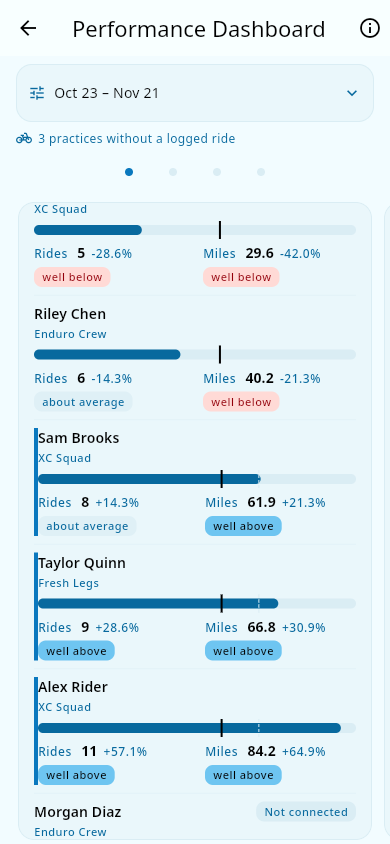
- Those entries count toward the team's ride volume — the performance dashboard and weekly totals. Athletes and parents can read them, and a parent can remove one they believe is wrong.
Who sees what
- Coach — logs a group ride for a group they coach, from the event page or the Home Rides to log card. A ride logged from the Home card can be undone for 60 seconds; otherwise ask a team admin or owner who also coaches that group and is checked in to replace it with one of their own matching rides.
- Team admin or owner — replaces a ride already logged for a group, from the event page, but only if they also coach that group, are checked in to the practice, and have their own matching ride. Team admins and owners also see a line on the performance dashboard naming the practices that still have no logged ride — for example, 3 practices without a logged ride.
- Athlete — reads their own coach-logged rides in My Activities and from the Activities tab (the screen headed Your Performance).
- Parent — reads their child's coach-logged rides in the child's Rides section and can remove one.
Coaches log only their own rides; nobody can log someone else's ride for them. Athletes never apply or edit a coach-logged ride.
What is stored
For each group ride, Groupset keeps:
- the ride totals that cover the practice window — distance, time, and climb — not the coach's whole ride;
- a short, trimmed route preview for the athlete and parent views, never the full track;
- a clear label that the ride is an estimate from the coach's ride.
No route or map appears on coach surfaces. Nothing is recorded live — the ride log is built from a ride that already exists.
Availability
If you don't see a Group ride card or a Rides to log card, this may not be available for your team yet. The same applies to the Coach-logged rides and Rides sections.
Notes and limits
- One group ride per practice and group. A Whole team ride covers every checked-in athlete, whatever group they were in.
- A coach-logged ride is always an estimate, never a measured activity. It never replaces or changes an athlete's own ride.
- An athlete who already has their own measured activity covering the practice window is skipped, so the same riding isn't counted twice.
- Coaches can only confirm their own synced rides, and only a ride that lines up with the practice.
- Removing a coach-logged ride is a family choice. It removes only that athlete's entry — not the coach's group ride, and not anyone else's entry.
Related pages
- Log a group ride — the coach's two ways to log a ride, undo, and replacing one.
- See and remove a coach-logged ride — where athletes and parents find the entries.
- Attendance — check-in is what makes an athlete eligible for a coach-logged ride.
- Events and practices — the event page where the Group ride card sits.
- Performance analytics — where coach-logged rides count toward team volume.
- Coach insights — the group report.
- Strava activities — measured rides from a rider's own account.
- Troubleshooting: Ride log — when a ride or card doesn't appear.
- Glossary — plain-English definitions of ride-log terms.