Follow alert settings
Who this is for: follower Applies to: all
What this page covers
If you follow races without belonging to a team, the race-day alerts you get are yours alone. This page shows where those settings live and what each of the five switches does, so you can keep the alerts you want and quiet the rest.
Before you start
- You need a Follow account — the kind you create with your email and a one-time code, without joining a team. See Your Follow account.
- Be signed in on the device where you want to change the settings. They are saved to your account, so they apply everywhere you sign in.
Step-by-step
- Open the Home tab.
- Tap the round avatar at the top right of the screen — a circle with your initial, or a small person icon.
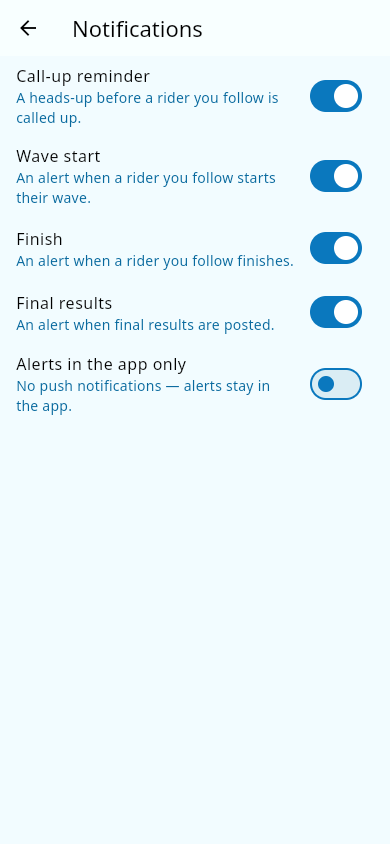
- In the Account sheet, tap Notifications. The screen that opens is titled Notifications.
- Set the switches you want:
| Switch | What it says underneath | What it does | Starts as |
|---|---|---|---|
| Call-up reminder | "A heads-up before a rider you follow is called up." | An alert about 15 minutes before a rider you follow is due to start. | On |
| Wave start | "An alert when a rider you follow starts their wave." | An alert at the moment that rider's wave starts. | On |
| Finish | "An alert when a rider you follow finishes." | An alert when that rider finishes. | On |
| Final results | "An alert when final results are posted." | One alert when the race's final results are posted. | On |
| Alerts in the app only | "No push notifications — alerts stay in the app." | Stops push notifications. The alerts still arrive in the Inbox tab. | Off |
Each switch saves the moment you tap it — there is no Save button.
What you should see
- The screen is titled Notifications and lists exactly those five switches — the first four on and Alerts in the app only off, unless you have changed them before.
- While a change is saving, a thin progress line appears under the title and every switch is briefly unresponsive.
- Leave the screen and come back: your choices are still the way you set them.
Notes and limits
- Alerts only arrive for races you follow and riders you pin. Following a race without pinning anyone gives you the race-level alerts (final results) but no per-rider calls.
- There is no switch for one rider. Nothing in the app turns alerts off for a single followed rider. To stop alerts from one rider, unpin them on that race's screen; to stop all alerts from one race, open the race and turn on Mute updates.
- Call-up reminder and Wave start share a daily limit. For one race, on any one day, those two alerts stop after 10 together, however many riders you have pinned. A start-time change notice is deliberately not counted against that limit, so a correction still reaches you on a busy day. All alert kinds are also capped so a busy race cannot flood you — see Follow notifications.
- A moved start is corrected, not re-announced. If the organizer changes a wave's start time after a reminder or start alert has already gone out, you get one notice titled start time updated that names both the old and the new time, instead of a second heads-up for the same wave.
- A start alert is never sent late. Once a wave's start time has passed, that alert is skipped rather than delivered as "starting now".
- No alert before the organizer publishes a start. Until a wave's start time is published, no call-up reminder or start alert goes out for it — the app never guesses a time.
- The alert names the wave the way the organizer published it (for example "JV B Boys" or "JV B Boys Split 1"), never a number the app derives on its own.
- While a change is saving, each switch keeps the last value the app confirmed. A change the app refuses never looks accepted — if a switch flips back, tap it again.
- If the settings can't be loaded, the screen shows Could not load notification settings with a Try again button, and no switches at all. The app never shows made-up defaults.
- Alerts in the app only affects push notifications only. With it on, your phone stays quiet, but the Inbox tab still collects the alerts.
- These settings cover Follow alerts only. Announcements, chat, and event alerts are in Your notification preferences.
- If you sign out, alerts stop on that device. Your follows and these settings are saved, and signing back in with your email restores them.
Related pages
- Race-day alerts for the riders you follow — what each alert looks like when it arrives.
- Your Follow account — signing in with an email and one-time code, and the Inbox.
- Following races and riders — following a race, pinning riders, and muting a race.
- Your notification preferences — the team-side switches on your profile.